
我们都知道想要为大模型集成一个工具能力,可以使用MCP,也可以使用Skill,那这两种方案到底有什么区别?
首先来说出现时间更早的MCP,MCP的全称叫作Model-Context-Protocol(模型上下文协议),看名字就知道,MCP本质是一种协议。那为什么需要这种协议?一个新技术的出现,一定是为了解决某种问题。在MCP还没有出现的时候,如果要为大模型集成工具能力,需要通过Function Call(函数式调用)实现。Function Call是通过api调用大模型时传递的一组参数,用于告诉大模型可以调用哪些函数、这些函数是做什么的、函数的参数结构,这样就可以让大模型在处理某个问题时,自己选择调用哪个函数去解决问题。但是,新的问题出现了,Function Call是OpenAI提出的概念,但并没有给出一套统一的标准,这也导致了各模型厂商的Function Call参数结构并不统一。比如我的项目中接入了OpenAI、kimi、deepseek三家厂商的模型,我想要为大模型集成一个查询天气的工具,那我需要分别对接这三个厂商的function Call,也就是说一个工具的集成我写了三套代码。
所以使用Function Call存在重复造轮子的问题,为此Anthropic提出了MCP协议统一了标准,将所有的工具做成MCP Server,基于大模型的应用只需要安装MCP Client就能够使用提供的工具。正如 USB-C 统一了手机、电脑、外设之间的连接标准,让不同品牌、不同功能的设备都能即插即用,MCP 也为大语言模型(LLM)提供了一个通用接口,使其能够以统一方式调用各种外部工具、数据源和服务,而无需为每个工具单独开发适配器。

但是随着MCP的普及和使用,很快就出现了新的问题。虽然MCP中提供了工具的描述,但大模型并不能准确知道什么时候用、怎么用、按什么顺序用。用户的问题往往是动态的,大模型看到一堆工具,只能根据语义相似度去猜,很可能选了名字像但不对的工具、或者漏了前置步骤、或者不知道要组合调用等等,所以在使用过程中,你会发现虽然通过MCP为大模型连接了工具,但无法稳定交付。为此Anthropic又提出了Skill的概念,Skill(技能)是一段标准化、结构化、可复用的指令包,用来让 AI 模型学会并稳定执行某一类特定任务。它不是模型本身,也不是插件,更不是代码,而是:一套任务说明、一套行为规则、一套输出格式、一套判断逻辑。打包在一起,让 AI 每次遇到同类任务时,都能一致、可靠、不出错地完成。通俗一点地说,就是为大模型准备的"说明书+工作手册"。
所以MCP和Skill的关系通常不是互斥的,而是互补的,它们解决了不同的问题,MCP负责工具的连接,Skill负责可靠交付。
除了解决的问题不同,两者在上下文中的加载方式也有显著的差异。以openclaw为例,我写了一个代理工具,将openclaw调用大模型改为调用我的代理工具,然后由代理工具记录入参出参再调用大模型,这样就能够直观的看到MCP和Skill在上下文中加载的区别。
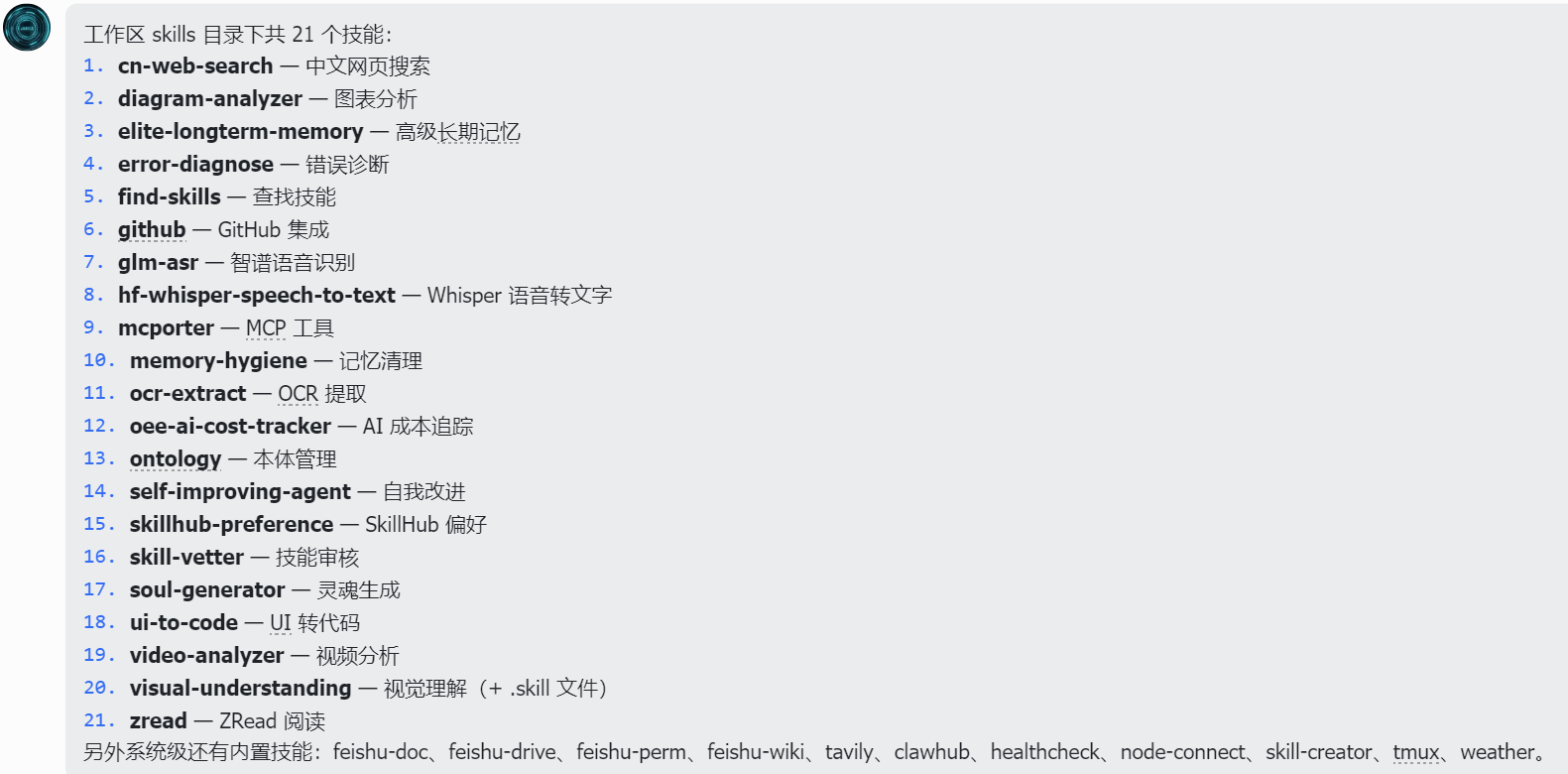
首先确认一下我已经安装的skill
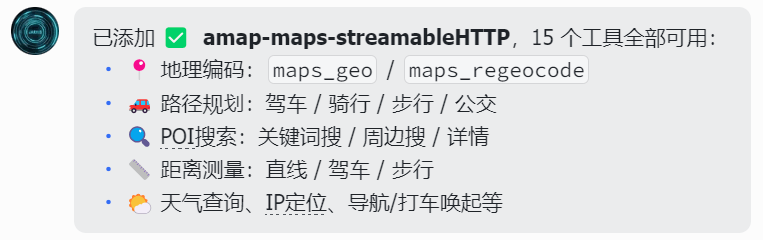
添加高德MCP服务
接着发送一条消息,捕获请求日志。

这是捕获到的系统提示词,非常的长(这也是openclaw特别费token的原因之一),仔细阅读,其中有一段关于skill的描述:
## Skills (mandatory)\nBefore replying: scan <available_skills> <description> entries.\n- If exactly one skill clearly applies: read its SKILL.md at <location> with `read`, then follow it.\n- If multiple could apply: choose the most specific one, then read/follow it.\n- If none clearly apply: do not read any SKILL.md.\nConstraints: never read more than one skill up front; only read after selecting.\n- When a skill drives external API writes, assume rate limits: prefer fewer larger writes, avoid tight one-item loops, serialize bursts when possible, and respect 429/Retry-After.\nThe following skills provide specialized instructions for specific tasks.\nUse the read tool to load a skill's file when the task matches its description.\nWhen a skill file references a relative path, resolve it against the skill directory (parent of SKILL.md / dirname of the path) and use that absolute path in tool commands.翻译过来:
## 技能(强制要求)
在回复之前:请扫描 <available_skills> 的 <description> 条目。
- 如果只有一个技能明确适用:请使用 `read` 读取其位于 <location> 的 SKILL.md 文件,并遵照执行。
- 如果有多个技能可能适用:请选择最具体的一个,然后读取/遵照执行。
- 如果没有明确适用的:请不要读取任何 SKILL.md 文件。
约束条件:绝对不要在最开始同时读取多个技能;只能在做出选择之后读取。
- 当某项技能驱动外部 API 写入时,请假定存在速率限制:倾向于较少次数、较大数据量的写入,避免紧凑的单条目循环,在可能的情况下将突发请求串行化处理,并遵守 429/Retry-After 机制。
以下技能为特定任务提供了专门的指示。
当任务与技能描述相匹配时,请使用 read 工具加载该技能的文件。
当技能文件引用了相对路径时,请根据该技能的所在目录(SKILL.md 的父目录 / 该路径的目录名)对其进行解析,并在工具命令中使用解析出的绝对路径。
后面跟的是<available_skills>
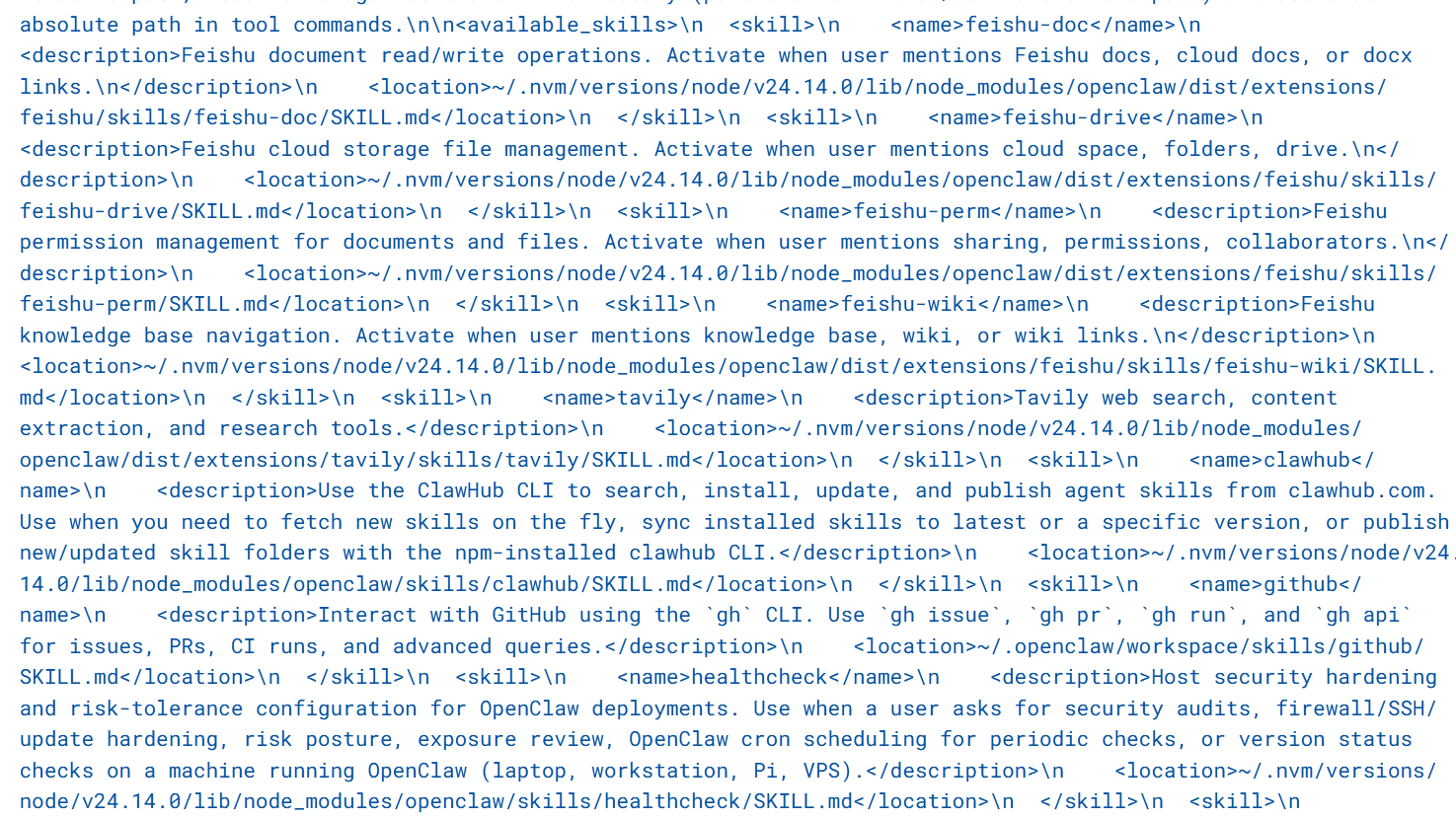
openclaw中的Skill以<name>、<desciption>的形式加载到了系统提示词中,并且是按需加载,仅命中某一个Skill时,才会读取完整的Skill.md。
接下来再看MCP的加载:
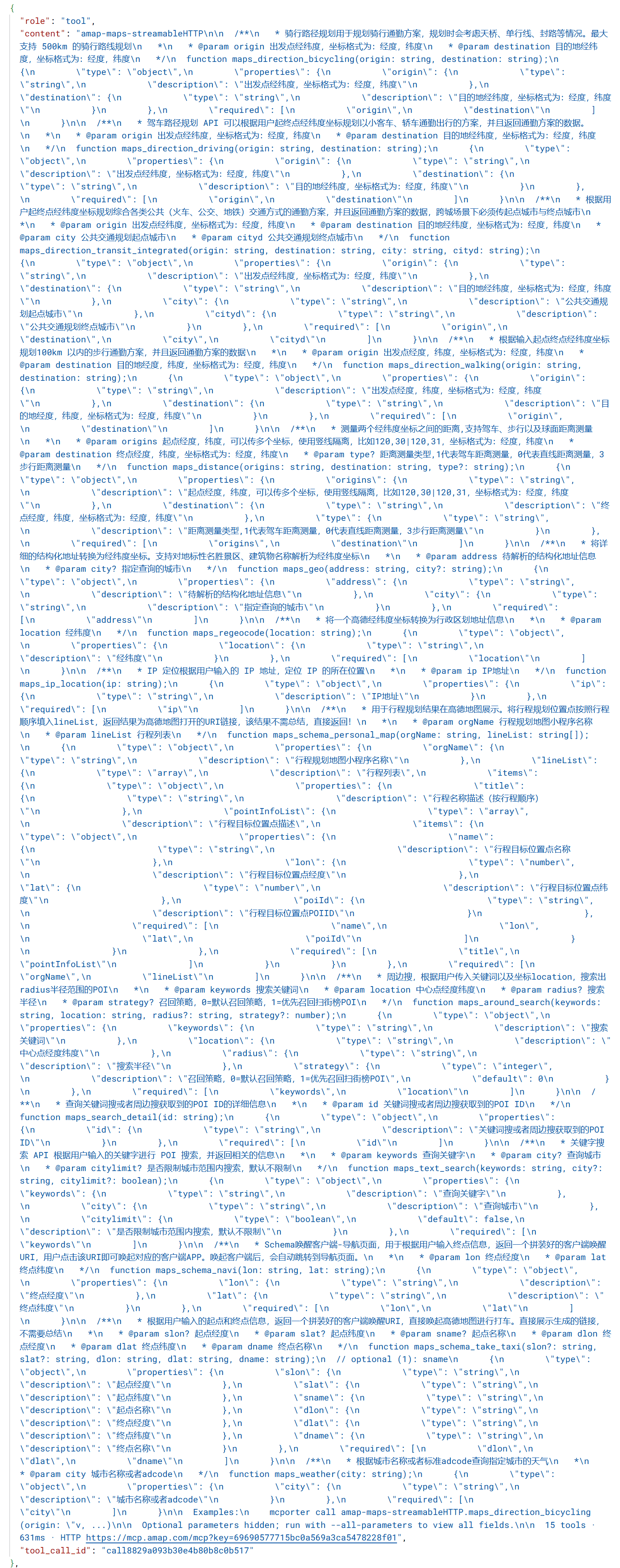
格式化之后,是一段带有doc注释的js函数以及json schema:
amap-maps-streamableHTTP

  /**
   * 骑行路径规划用于规划骑行通勤方案,规划时会考虑天桥、单行线、封路等情况。最大支持 500km 的骑行路线规划
   *
   * @param origin 出发点经纬度,坐标格式为:经度,纬度
   * @param destination 目的地经纬度,坐标格式为:经度,纬度
   */
  function maps_direction_bicycling(origin: string, destination: string);
      {
        "type": "object",
        "properties": {
          "origin": {
            "type": "string",
            "description": "出发点经纬度,坐标格式为:经度,纬度"
          },
          "destination": {
            "type": "string",
            "description": "目的地经纬度,坐标格式为:经度,纬度"
          }
        },
        "required": [
          "origin",
          "destination"
        ]
      }

  /**
   * 驾车路径规划 API 可以根据用户起终点经纬度坐标规划以小客车、轿车通勤出行的方案,并且返回通勤方案的数据。
   *
   * @param origin 出发点经纬度,坐标格式为:经度,纬度
   * @param destination 目的地经纬度,坐标格式为:经度,纬度
   */
  function maps_direction_driving(origin: string, destination: string);
      {
        "type": "object",
        "properties": {
          "origin": {
            "type": "string",
            "description": "出发点经纬度,坐标格式为:经度,纬度"
          },
          "destination": {
            "type": "string",
            "description": "目的地经纬度,坐标格式为:经度,纬度"
          }
        },
        "required": [
          "origin",
          "destination"
        ]
      }

  /**
   * 根据用户起终点经纬度坐标规划综合各类公共(火车、公交、地铁)交通方式的通勤方案,并且返回通勤方案的数据,跨城场景下必须传起点城市与终点城市
   *
   * @param origin 出发点经纬度,坐标格式为:经度,纬度
   * @param destination 目的地经纬度,坐标格式为:经度,纬度
   * @param city 公共交通规划起点城市
   * @param cityd 公共交通规划终点城市
   */
  function maps_direction_transit_integrated(origin: string, destination: string, city: string, cityd: string);
      {
        "type": "object",
        "properties": {
          "origin": {
            "type": "string",
            "description": "出发点经纬度,坐标格式为:经度,纬度"
          },
          "destination": {
            "type": "string",
            "description": "目的地经纬度,坐标格式为:经度,纬度"
          },
          "city": {
            "type": "string",
            "description": "公共交通规划起点城市"
          },
          "cityd": {
            "type": "string",
            "description": "公共交通规划终点城市"
          }
        },
        "required": [
          "origin",
          "destination",
          "city",
          "cityd"
        ]
      }

  /**
   * 根据输入起点终点经纬度坐标规划100km 以内的步行通勤方案,并且返回通勤方案的数据
   *
   * @param origin 出发点经度,纬度,坐标格式为:经度,纬度
   * @param destination 目的地经度,纬度,坐标格式为:经度,纬度
   */
  function maps_direction_walking(origin: string, destination: string);
      {
        "type": "object",
        "properties": {
          "origin": {
            "type": "string",
            "description": "出发点经度,纬度,坐标格式为:经度,纬度"
          },
          "destination": {
            "type": "string",
            "description": "目的地经度,纬度,坐标格式为:经度,纬度"
          }
        },
        "required": [
          "origin",
          "destination"
        ]
      }

  /**
   * 测量两个经纬度坐标之间的距离,支持驾车、步行以及球面距离测量
   *
   * @param origins 起点经度,纬度,可以传多个坐标,使用竖线隔离,比如120,30|120,31,坐标格式为:经度,纬度
   * @param destination 终点经度,纬度,坐标格式为:经度,纬度
   * @param type? 距离测量类型,1代表驾车距离测量,0代表直线距离测量,3步行距离测量
   */
  function maps_distance(origins: string, destination: string, type?: string);
      {
        "type": "object",
        "properties": {
          "origins": {
            "type": "string",
            "description": "起点经度,纬度,可以传多个坐标,使用竖线隔离,比如120,30|120,31,坐标格式为:经度,纬度"
          },
          "destination": {
            "type": "string",
            "description": "终点经度,纬度,坐标格式为:经度,纬度"
          },
          "type": {
            "type": "string",
            "description": "距离测量类型,1代表驾车距离测量,0代表直线距离测量,3步行距离测量"
          }
        },
        "required": [
          "origins",
          "destination"
        ]
      }

  /**
   * 将详细的结构化地址转换为经纬度坐标。支持对地标性名胜景区、建筑物名称解析为经纬度坐标
   *
   * @param address 待解析的结构化地址信息
   * @param city? 指定查询的城市
   */
  function maps_geo(address: string, city?: string);
      {
        "type": "object",
        "properties": {
          "address": {
            "type": "string",
            "description": "待解析的结构化地址信息"
          },
          "city": {
            "type": "string",
            "description": "指定查询的城市"
          }
        },
        "required": [
          "address"
        ]
      }

  /**
   * 将一个高德经纬度坐标转换为行政区划地址信息
   *
   * @param location 经纬度
   */
  function maps_regeocode(location: string);
      {
        "type": "object",
        "properties": {
          "location": {
            "type": "string",
            "description": "经纬度"
          }
        },
        "required": [
          "location"
        ]
      }

  /**
   * IP 定位根据用户输入的 IP 地址,定位 IP 的所在位置
   *
   * @param ip IP地址
   */
  function maps_ip_location(ip: string);
      {
        "type": "object",
        "properties": {
          "ip": {
            "type": "string",
            "description": "IP地址"
          }
        },
        "required": [
          "ip"
        ]
      }

  /**
   * 用于行程规划结果在高德地图展示。将行程规划位置点按照行程顺序填入lineList,返回结果为高德地图打开的URI链接,该结果不需总结,直接返回!
   *
   * @param orgName 行程规划地图小程序名称
   * @param lineList 行程列表
   */
  function maps_schema_personal_map(orgName: string, lineList: string[]);
      {
        "type": "object",
        "properties": {
          "orgName": {
            "type": "string",
            "description": "行程规划地图小程序名称"
          },
          "lineList": {
            "type": "array",
            "description": "行程列表",
            "items": {
              "type": "object",
              "properties": {
                "title": {
                  "type": "string",
                  "description": "行程名称描述(按行程顺序)"
                },
                "pointInfoList": {
                  "type": "array",
                  "description": "行程目标位置点描述",
                  "items": {
                    "type": "object",
                    "properties": {
                      "name": {
                        "type": "string",
                        "description": "行程目标位置点名称"
                      },
                      "lon": {
                        "type": "number",
                        "description": "行程目标位置点经度"
                      },
                      "lat": {
                        "type": "number",
                        "description": "行程目标位置点纬度"
                      },
                      "poiId": {
                        "type": "string",
                        "description": "行程目标位置点POIID"
                      }
                    },
                    "required": [
                      "name",
                      "lon",
                      "lat",
                      "poiId"
                    ]
                  }
                }
              },
              "required": [
                "title",
                "pointInfoList"
              ]
            }
          }
        },
        "required": [
          "orgName",
          "lineList"
        ]
      }

  /**
   * 周边搜,根据用户传入关键词以及坐标location,搜索出radius半径范围的POI
   *
   * @param keywords 搜索关键词
   * @param location 中心点经度纬度
   * @param radius? 搜索半径
   * @param strategy? 召回策略,0=默认召回策略,1=优先召回扫街榜POI
   */
  function maps_around_search(keywords: string, location: string, radius?: string, strategy?: number);
      {
        "type": "object",
        "properties": {
          "keywords": {
            "type": "string",
            "description": "搜索关键词"
          },
          "location": {
            "type": "string",
            "description": "中心点经度纬度"
          },
          "radius": {
            "type": "string",
            "description": "搜索半径"
          },
          "strategy": {
            "type": "integer",
            "description": "召回策略,0=默认召回策略,1=优先召回扫街榜POI",
            "default": 0
          }
        },
        "required": [
          "keywords",
          "location"
        ]
      }

  /**
   * 查询关键词搜或者周边搜获取到的POI ID的详细信息
   *
   * @param id 关键词搜或者周边搜获取到的POI ID
   */
  function maps_search_detail(id: string);
      {
        "type": "object",
        "properties": {
          "id": {
            "type": "string",
            "description": "关键词搜或者周边搜获取到的POI ID"
          }
        },
        "required": [
          "id"
        ]
      }

  /**
   * 关键字搜索 API 根据用户输入的关键字进行 POI 搜索,并返回相关的信息
   *
   * @param keywords 查询关键字
   * @param city? 查询城市
   * @param citylimit? 是否限制城市范围内搜索,默认不限制
   */
  function maps_text_search(keywords: string, city?: string, citylimit?: boolean);
      {
        "type": "object",
        "properties": {
          "keywords": {
            "type": "string",
            "description": "查询关键字"
          },
          "city": {
            "type": "string",
            "description": "查询城市"
          },
          "citylimit": {
            "type": "boolean",
            "default": false,
            "description": "是否限制城市范围内搜索,默认不限制"
          }
        },
        "required": [
          "keywords"
        ]
      }

  /**
   * Schema唤醒客户端-导航页面,用于根据用户输入终点信息,返回一个拼装好的客户端唤醒URI,用户点击该URI即可唤起对应的客户端APP。唤起客户端后,会自动跳转到导航页面。
   *
   * @param lon 终点经度
   * @param lat 终点纬度
   */
  function maps_schema_navi(lon: string, lat: string);
      {
        "type": "object",
        "properties": {
          "lon": {
            "type": "string",
            "description": "终点经度"
          },
          "lat": {
            "type": "string",
            "description": "终点纬度"
          }
        },
        "required": [
          "lon",
          "lat"
        ]
      }

  /**
   * 根据用户输入的起点和终点信息,返回一个拼装好的客户端唤醒URI,直接唤起高德地图进行打车。直接展示生成的链接,不需要总结
   *
   * @param slon? 起点经度
   * @param slat? 起点纬度
   * @param sname? 起点名称
   * @param dlon 终点经度
   * @param dlat 终点纬度
   * @param dname 终点名称
   */
  function maps_schema_take_taxi(slon?: string, slat?: string, dlon: string, dlat: string, dname: string);
  // optional (1): sname
      {
        "type": "object",
        "properties": {
          "slon": {
            "type": "string",
            "description": "起点经度"
          },
          "slat": {
            "type": "string",
            "description": "起点纬度"
          },
          "sname": {
            "type": "string",
            "description": "起点名称"
          },
          "dlon": {
            "type": "string",
            "description": "终点经度"
          },
          "dlat": {
            "type": "string",
            "description": "终点纬度"
          },
          "dname": {
            "type": "string",
            "description": "终点名称"
          }
        },
        "required": [
          "dlon",
          "dlat",
          "dname"
        ]
      }

  /**
   * 根据城市名称或者标准adcode查询指定城市的天气
   *
   * @param city 城市名称或者adcode
   */
  function maps_weather(city: string);
      {
        "type": "object",
        "properties": {
          "city": {
            "type": "string",
            "description": "城市名称或者adcode"
          }
        },
        "required": [
          "city"
        ]
      }

  Examples:
    mcporter call amap-maps-streamableHTTP.maps_direction_bicycling(origin: "v, ...)

  Optional parameters hidden; run with --all-parameters to view all fields.

15 tools · 631ms · HTTP https://mcp.amap.com/mcp?key=69690577715bc0a569a3ca5478228f01可以看到,openclaw将高德MCP提供的所有工具放入{"role":"tool"} 的消息中进行加载
早期OpenAI叫function_call,后来同一升级为tool_call,“role”:“tool”就是这个机制中的固定消息角色。
了解了二者各自解决的问题与加载机制后,结合我在 OpenClaw 中接入高德地图能力的实践,更能直观体现 MCP 与 Skill 搭配使用才是最佳实践。
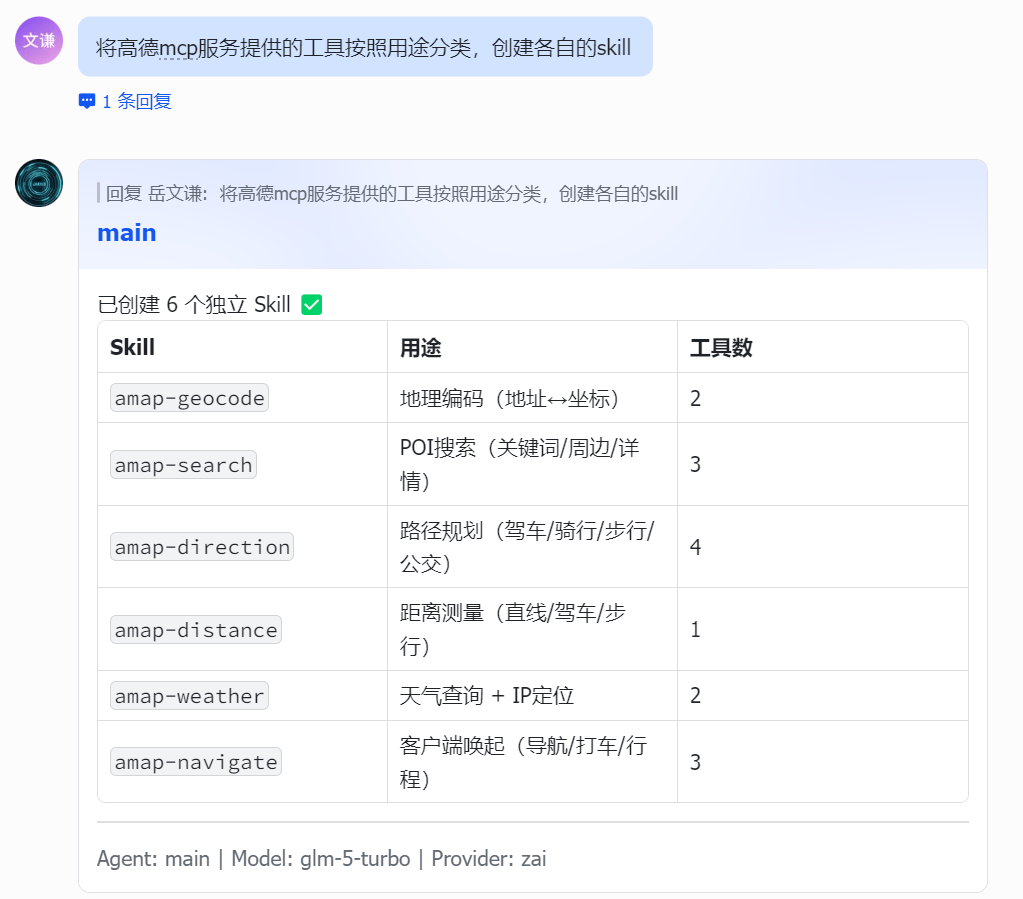
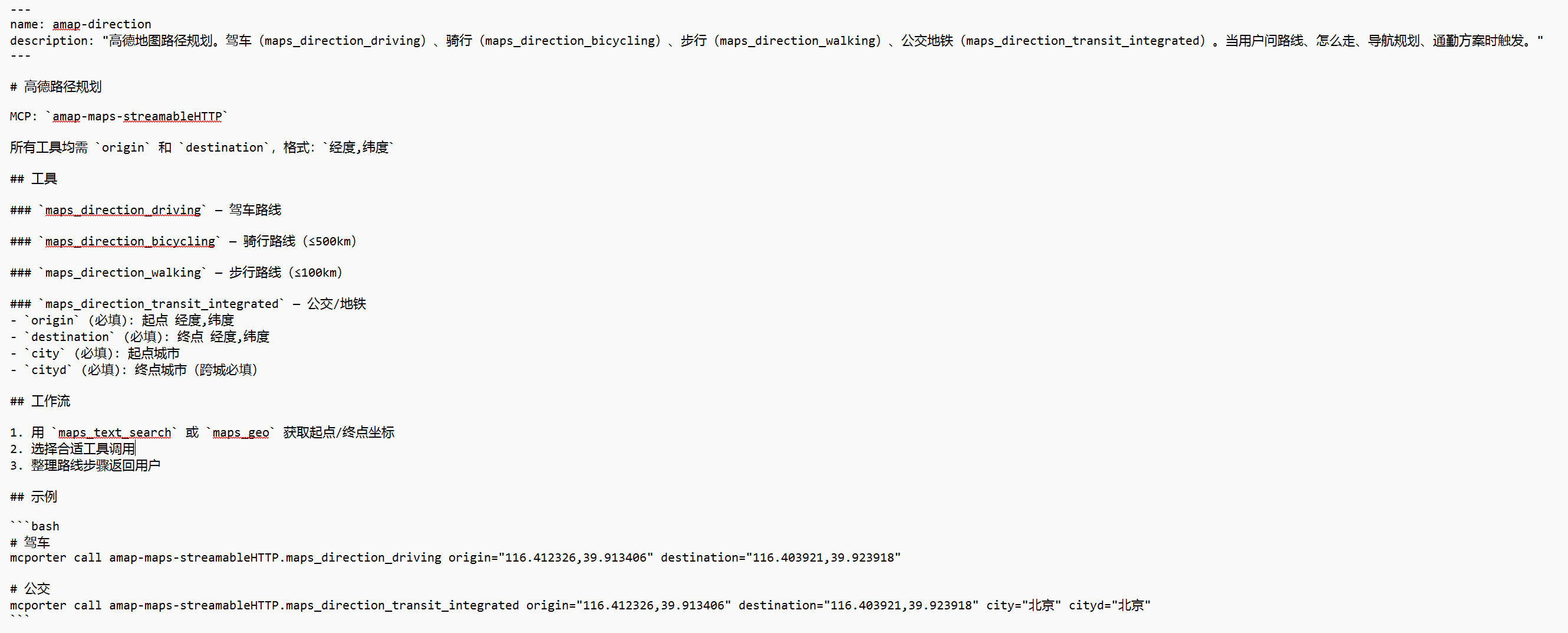
高德官方并未提供现成的 CLI 工具与 Skill,仅开放了 MCP 接入方式。因此在 OpenClaw 中,我先通过 mcporter 接入高德 MCP 服务。高德 MCP 内置了路径规划、天气查询、距离测量等共计 15 种基础工具,我再根据实际使用场景对这些工具能力进行拆分与封装,为其创建对应的 Skill(这一步可直接在 OpenClaw 中完成)。
综上,MCP 与 Skill 并非二选一的替代关系,而是连接层与执行层的黄金搭档。MCP 像统一的 “接口插座”,解决大模型调用工具的标准与兼容问题;Skill 像精准的 “操作手册”,解决工具使用的稳定与可靠问题。一个负责能用上,一个负责用得对,二者配合才能让大模型从 “能调用工具” 升级为 “稳定完成复杂任务”。
未来大模型工具化的趋势,必然是MCP 统一连接 + Skill 标准化执行的组合模式。对于开发者而言,先通过 MCP 打通工具生态,再用 Skill 沉淀可复用的任务流程,既能避免重复开发,又能保证 AI 行为一致可控,这也是 Anthropic 提出这两套方案的核心价值所在。